Design
The high level ROS functionalities (publisher, subscriber, TF2
broadcast, TF2 lookup or parameter client) are all encapsulated as
Slicer MRML nodes, i.e. derived from the class vtkMRMLNode and
added to the MRML Scene. This allows to leverage some of the Slicer
features:
Using Slicer node observer pattern to trigger user code when a new ROS message has been received (subscribers, parameters or TF2 lookups).
Data visualization using the MRML scene.
Retrieve node by ID, name or type.
Python API automatically generated on top of the native C++ code.
Ability to save and restore your ROS nodes along the MRML scene.
All the SlicerROS2 classes follow the Slicer naming convention,
i.e. vtkMRMLxxxxNode. We added the ROS2 “prefix” for all the
class names so we’re using vtkMRMLROS2xxxxNode where xxxx
represents a ROS functionality. This works fairly well but makes it a
bit hard to read for the MRML node than encapsulates a ROS node,
i.e. a vtkMRMLROS2NodeNode. No - this is not a typo.
C++ vs Python
Since both Slicer and ROS provide a Python interface we first tried to
use Python as the glue between Slicer and ROS. The main issue on
Ubuntu is that ROS relies on the system python (version 3.8 on Ubuntu
20.04) while Slicer builds it’s own Python interpreter (e.g. 3.9).
Since both libraries are not just native Python code, loading
(import) both Slicer and ROS in the same interpreter is not
possible as they rely on different versions of Python C++ libraries.
We also considered using the same Python version for both Slicer and
ROS, i.e. build everything using Python 3.8 or Python 3.9.
Unfortunately, building Slicer against the Ubuntu provided Python
interpreter (3.8) is no currently supported by the Slicer “super
build”. Alternatively, using the Slicer provided Python 3.9 to build
the ROS Python bindings (rclpy) proved challenging unless one
wanted to recompile ROS from scratch instead of using the existing
Ubuntu binary packages.
We ultimately decided to implement the SlicerROS2 module in C++ and
rely on the VTK/Slicer build to provide the Python bindings. The
SlicerROS2 module is compiled against the Slicer and ROS 2 libraries
which is a bit challenging since both packages have their own CMake
macros and have different Python version requirements. The
CMakeLists.txt provided along SlicerROS2 works but you’ll have to
ignore some error and warning messages.
Execution Model
One of the challenges of integrating ROS in Slicer is to figure out the execution model. ROS relies heavily on callbacks triggered by external messages. This requires to either use a separate thread to “spin” the ROS event loop or periodically call the ROS “spin” method from the application’s main thread. Since we are heavily relying on the MRML scene, using a separate thread is not trivial. Therefore the SlicerROS2 module relies on the main Slicer thread to trigger a periodic call to the ROS spin. We currently use a Qt timer to trigger this periodic call.
Note
The default frequency for the SlicerROS2 module is 50Hz, i.e. 20ms
Templates vs Inheritance
The two packages also differ in their design patterns. Slicer (and VTK) strongly relies on base classes and inheritance to allow runtime decisions. Meanwhile, ROS heavily relies on templates and type traits which are handled at compilation time. Most ROS communication mechanisms only support a finite number of data types (e.g. parameters are booleans, integers, floating points, strings or vector of aforementioned types, TF2 uses transforms only…) so this is not a major issue.
The main difficulty lies in supporting many ROS topics and services. For our code, we ended up using templates for our internal data structures and add some macros to generate the VTK user classes. These macros use template specialization and add some methods to create a C++ class that can be used within Slicer (including the Python bindings generation).
Code generation
Motivation
It’s not always easy to find a VTK object corresponding to a ROS
message, i.e. a VTK object that replicates all the information
contained in the ROS message (or service). On option is to manually
create new VTK objects (derived from vtkObject).
This can be extremely tedious, so we added a code generator that can
create a VTK object matching a ROS message. The code generator will
also create the overloaded conversion methods (vtkSlicerToROS2 and
vtkROS2ToSlicer) as well as code to call all the macros required
to create the publisher or subscriber node.
Example
For example, the WrenchStamped ROS message contains a header
and a wrench:
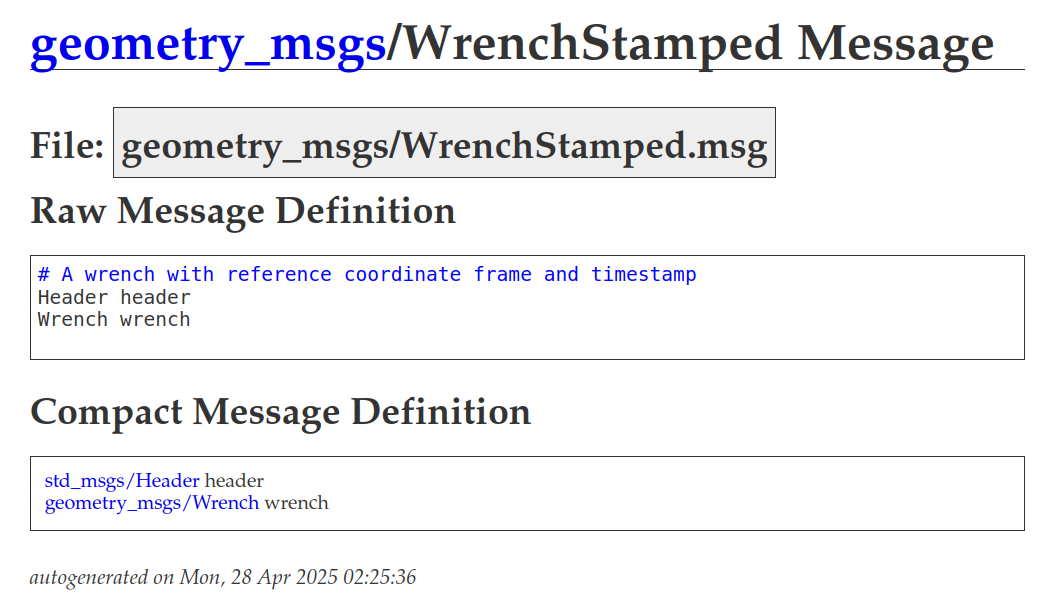
From the message definition, our code generator can create the
definition of an equivalent vtkObject and define two conversion
methods (to and from ROS/Slicer) without any user input:
#ifndef vtkGeometryMsgsWrenchStamped_h
#define vtkGeometryMsgsWrenchStamped_h

// identify_imports                   // <---------------- headers automatically identified
#include <vtkObject.h>
...
#include <vtkStdMsgsHeader.h>
#include <vtkDoubleArray.h>

// generate_class
class vtkGeometryMsgsWrenchStamped : public vtkObject // <-- derived from VTK
{
public:
  vtkTypeMacro(vtkGeometryMsgsWrenchStamped, vtkObject);  // <-- defines VTK required method
  static vtkGeometryMsgsWrenchStamped* New(void);
  void PrintSelf(std::ostream& os, vtkIndent indent) override;

  // vtk get/set
  vtkStdMsgsHeader* GetHeader(void) { return header_; }   // <-- accessor using a custom VTK object
  void SetHeader(vtkStdMsgsHeader* value) { header_ = value; }

  // vtk get/set
  vtkDoubleArray* GetWrench(void) { return wrench_; }     // <-- accessor using a native VTK object
  void SetWrench(vtkDoubleArray* value) { wrench_ = value; }

protected:
  vtkSmartPointer<vtkStdMsgsHeader> header_;
  vtkSmartPointer<vtkDoubleArray> wrench_;
  vtkGeometryMsgsWrenchStamped();
  ~vtkGeometryMsgsWrenchStamped() override;
};

// generate_slicer_to_ros2_methods_for_class   // <-- declare conversion overloaded functions
void vtkSlicerToROS2(vtkGeometryMsgsWrenchStamped* input, geometry_msgs::msg::WrenchStamped & result, const std::shared_ptr<rclcpp::Node>& rosNode);
// generate_ros2_to_slicer_methods_for_class
void vtkROS2ToSlicer(const geometry_msgs::msg::WrenchStamped& input, vtkSmartPointer<vtkGeometryMsgsWrenchStamped> result);

#endif // vtkGeometryMsgsWrenchStamped_h
The class and functions implementation are also automatically generated:
#include "vtkGeometryMsgsWrenchStamped.h"
#include <vtkROS2ToSlicer.h>
#include <vtkSlicerToROS2.h>

// generate_class
vtkStandardNewMacro(vtkGeometryMsgsWrenchStamped);
vtkGeometryMsgsWrenchStamped::vtkGeometryMsgsWrenchStamped()
#include "vtkGeometryMsgsWrenchStamped.h"
#include <vtkROS2ToSlicer.h>
#include <vtkSlicerToROS2.h>

// generate_class
vtkStandardNewMacro(vtkGeometryMsgsWrenchStamped);
vtkGeometryMsgsWrenchStamped::vtkGeometryMsgsWrenchStamped()
{
  header_ = vtkStdMsgsHeader::New();
  wrench_ = vtkDoubleArray::New();
}
vtkGeometryMsgsWrenchStamped::~vtkGeometryMsgsWrenchStamped() = default;

// generate_print_self_methods_for_class
void vtkGeometryMsgsWrenchStamped::PrintSelf(std::ostream& os, vtkIndent indent) {
  Superclass::PrintSelf(os, indent);
  os << indent << "Header:" << std::endl;
  header_->PrintSelf(os, indent.GetNextIndent());
  os << indent << "Wrench:" << std::endl;
  wrench_->PrintSelf(os, indent.GetNextIndent());
}

// generate_slicer_to_ros2_methods_for_class
void vtkSlicerToROS2(vtkGeometryMsgsWrenchStamped* input, geometry_msgs::msg::WrenchStamped & result, const std::shared_ptr<rclcpp::Node>& rosNode) {
  (void)rosNode; // Suppress unused parameter warning
  vtkSlicerToROS2(input->GetHeader(), result.header, rosNode);
  vtkSlicerToROS2(input->GetWrench(), result.wrench, rosNode);
}

// generate_ros2_to_slicer_methods_for_class
void vtkROS2ToSlicer(const geometry_msgs::msg::WrenchStamped& input, vtkSmartPointer<vtkGeometryMsgsWrenchStamped> result) {
  vtkSmartPointer<vtkStdMsgsHeader> header = vtkSmartPointer<vtkStdMsgsHeader>::New();
  vtkROS2ToSlicer(input.header, header);
  result->SetHeader(header);
  vtkSmartPointer<vtkDoubleArray> wrench = vtkSmartPointer<vtkDoubleArray>::New();
  vtkROS2ToSlicer(input.wrench, wrench);
  result->SetWrench(wrench);
}
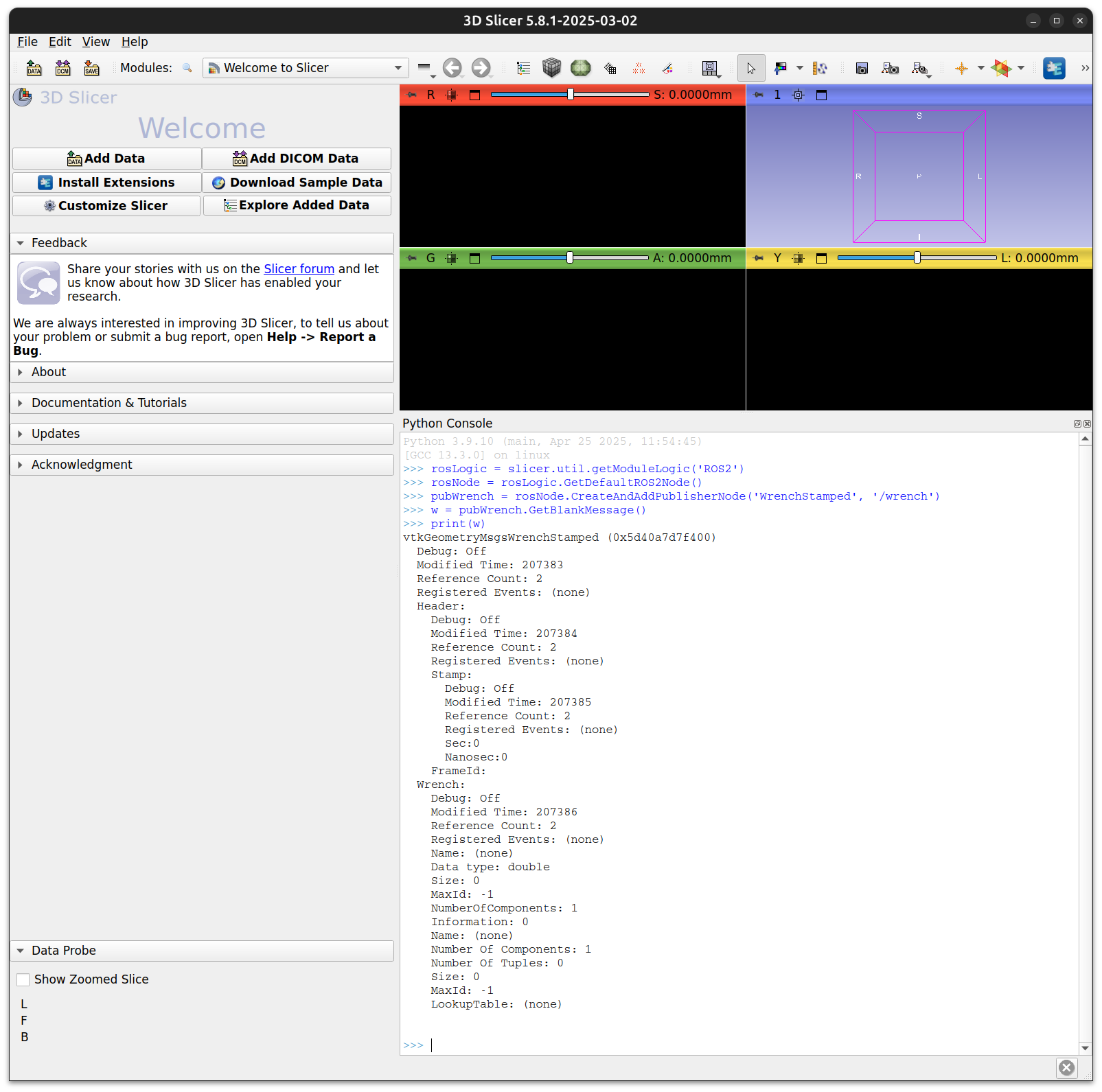
Since the build process for Slicer can also create Python wrappers for
all VTK objects, the vtkGeometryMsgsWrenchStamped is also
accessible in the Slicer Python interpreter:
CMake integration
Finally, we added a CMake macro to easily call the code generator in
the build process. The macro generate_ros2_nodes is used in
MRML/CMakeLists.txt and one can add new ROS messages types. New
publisher and subscriber nodes will be available after the SlicerROS2
module is recompiled.
generate_ros2_nodes(
  GENERATED_FILES_PREFIX
    "SLICER_ROS2_GENERATED"
  PUBLISHERS
    "geometry_msgs/msg/PoseStamped"
    "geometry_msgs/msg/TransformStamped"
    "geometry_msgs/msg/WrenchStamped"
    "sensor_msgs/msg/Joy"
    "sensor_msgs/msg/JointState"
    "geometry_msgs/msg/PoseArray"
  SUBSCRIBERS
    "geometry_msgs/msg/PoseStamped"
    "geometry_msgs/msg/TransformStamped"
    "geometry_msgs/msg/WrenchStamped"
    "sensor_msgs/msg/Joy"
    "sensor_msgs/msg/JointState"
    "geometry_msgs/msg/PoseArray"
  SERVICE_CLIENTS
    "turtlesim/srv/Spawn"
  DEPENDENCIES
    "std_msgs/msg/Header"
    "builtin_interfaces/msg/Time"
)
The CMake macro generate_ros2_nodes allows users to quickly add
new publishers and subscribers.
Warning
If you are adding messages from a ROS package not already used by
SlicerROS2, you will have to edit the main CMakeLists.txt.
See variable SlicerROS2_ROS_DEPENDENCIES.
Coordinate Systems and Units
The SlicerROS2 module will automatically convert between the default 3D frames conventions in Slicer and ROS. Slicer (and by extension all VTK objects in Slicer) follow the RAS convention and distances are provided in millimeters. Meanwhile ROS uses the RHS convention and SI units (meters).